A 'Educational' Guide to Streaming
Why rent culture when you can... 'borrow' it? A guide to self-hosting with Yams vs. the lazy man's WebTorrent method. Strictly for Swiss residents and educational purposes, obviously.
Alternative title: How to stop paying $15/month per streaming service and still watch movies.
Standard “I am not a lawyer” Disclaimer: This is for educational purposes only. I live in Switzerland, where Article 19 of the Copyright Act generally permits downloading copyrighted content for personal use, provided you don’t extensively upload (seed). If you live in the US, Germany, or basically anywhere else: use a VPN or don’t blame me when your ISP sends you a nastygram.
Let’s be real for a second. Streaming used to be cool. You paid Netflix ten bucks and got access to movies.
Now? Now we have “Enshittification.”
We have Netflix, Disney+, Hulu, Peacock, Paramount+, Apple TV+, and Amazon Prime (which now runs ads, because giving Bezos your money wasn’t degrading enough). To watch a single season of a show, you need a spreadsheet to figure out which service owns the rights this week. We’re renting access to culture, the rent is too damn high, and the landlord keeps removing the furniture.
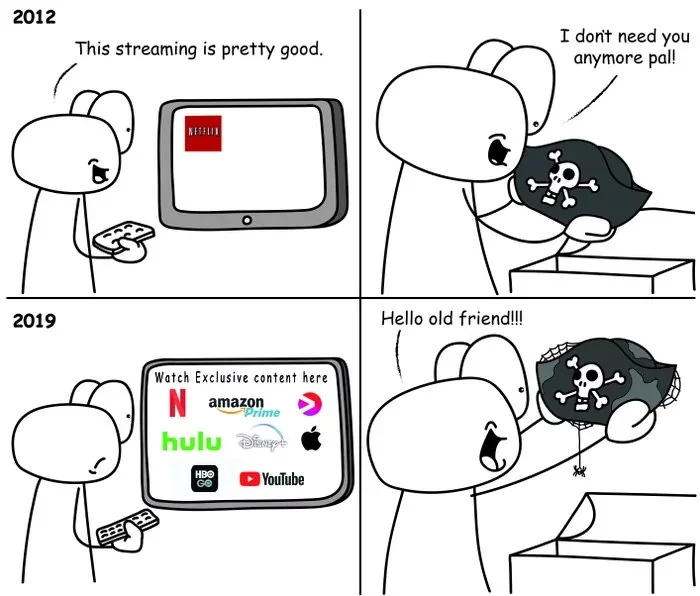
So, how do we opt out of this corporate hellscape? Two ways: the “I have a Homelab” way, and the “I just want to watch a movie right now” way.
Wait, What Even Is This? (The 5-Minute Explanation)
If you’ve only ever used Netflix, here’s the crash course:
Torrenting is peer-to-peer file sharing. Instead of downloading a file from one server (like Netflix’s), you download tiny pieces of it from dozens of other people who already have it. Those people are called “seeders.” You’re a “leecher” while downloading. Once you have the complete file, you become a seeder too.
Think of it like a book club where everyone brings photocopied pages to share, except it’s automatic and digital.
The torrent client (like WebTorrent or qBittorrent) is the software that does this. It downloads the file to a folder on your computer and, by default, automatically uploads (seeds) pieces to other people while you have it. This is the “community spirit” of torrenting, you take, you give back. If you want your disk space back later, you just delete the file. Simple.
Why would your ISP care? Your ISP can see you’re using torrents (the traffic pattern is obvious), and copyright holders sometimes monitor public torrent swarms to catch IP addresses. They send legal threats to ISPs, who forward them to you. If you live somewhere with aggressive copyright enforcement, using a VPN hides your torrent traffic from your ISP entirely, they can’t see what you’re downloading or that you’re even torrenting. The VPN provider sees it instead, which is why you pick one that doesn’t log (Mullvad, Proton, etc.).
Now that we’ve covered the basics, let’s talk methods.
Method 1: The “I Have a Server Rack in My Closet” Way (Yams)
If you’re the kind of person who knows what a reverse proxy is and enjoys managing Docker containers on a Friday night, check out Yams.media.
I’m not going to write a full guide here because their docs are actually good, but Yams is essentially a “Netflix-in-a-box” script. It spins up the holy trinity:
- Sonarr/Radarr: The brains (manages your wishlist)
- Transmission/qBittorrent: The muscle (downloads the Linux ISOs… wink)
- Jellyfin/Plex: The beauty (the UI that looks like Netflix so your family stops complaining)
It’s persistent. It downloads 4K HDR remuxes automatically. It creates a library you actually own. But it requires hardware, storage, and patience.
Method 2: The “Lazy & Transient” Way (BitSearch + Client)
For the rest of us who don’t want to maintain a 20TB NAS and just want to watch Dune without buffering or paying $15, this is the stack.
The goal here is Zero Footprint. You stream it, you watch it, you delete it. No storage woes.
The Stack
- Search Engine: BitSearch.to or any other good torrent search engine.
- Client: WebTorrent Desktop (or qBittorrent)
- Player: MPV (VLC is fine, but MPV is better. Fight me.)
Step 1: Finding the Goods (And Avoiding Malware)
Stop using The Pirate Bay. It’s 2025. It’s a graveyard of malware and honeypots.
Go to BitSearch.to or Bt4gprx (as bitsearch might be down…). Here’s why it’s better:
- It’s a meta-search engine. BitSearch aggregates results from multiple torrent sites, so you’re searching dozens of sources at once instead of one
- The recommendations are actually good. The sorting and filtering works properly, you get the most seeded, highest quality files at the top
- It’s fast. No waiting for searches to load or pages to render through twelve ad layers
- Clean interface. No popup ads trying to give you ransomware (though run an adblocker anyway)
Basically, it’s what torrent search should have been all along.
The “Don’t Download a Virus” Checklist:
Torrents are the Wild West. You need street smarts.
- File Extension: Check the “Files” tab before you download.
.mkv,.mp4,.avi= Good.exe,.lnk,.bat,.scr= MALWARE. Do not touch..zip,.rar(with a password) = SCAM
- File Size: Common sense applies.
- A 4K movie is roughly 10GB to 60GB
- A 1080p movie is 2GB to 8GB
- If you see “Avatar 2 4K HDR” at 200MB? That’s a virus.
- Seeders (The Green Number):
- High seeders (100+) usually means the file is healthy and safe
- Low seeders (0-5) with high leechers? Could be a fake file or just dead
- Verified tags: If the site has a “Verified” skull/badge/check, stick to those
Step 2: “Streaming” the Torrent
The magic of WebTorrent (or qBittorrent with “Download in Sequential Order” enabled) is that it fetches file pieces in order (1, 2, 3…) rather than randomly.
This allows you to hit Play while the file is still downloading.
What’s Actually Happening:
Your torrent client is downloading the file to a folder on your computer (usually ~/Downloads or wherever you set it). While it downloads, it’s also automatically seeding, uploading pieces to other people in the swarm.
You can turn off seeding in the settings, but the community spirit is that you should seed, at least until you hit a 1:1 ratio (uploaded as much as you downloaded). Without seeders, torrents die. Be cool, seed for a bit.
The Legal Stuff (Why VPNs Matter):
When you torrent, your IP address is visible to everyone in the swarm, including copyright trolls who monitor popular movies and send legal threats to ISPs.
- In Switzerland: Generally chill. Small-scale seeding for personal use rarely gets enforced.
- Outside Switzerland: Your ISP might forward you a nastygram or throttle your connection.
- The Fix: Use a VPN. It doesn’t hide your torrenting from the swarm, it hides your real IP and hides your torrent traffic from your ISP entirely. Your ISP just sees encrypted VPN traffic; they have no idea you’re torrenting. Use Mullvad, Proton, or similar (no-log policies), and bind your torrent client to the VPN interface so it can’t leak.
Step 3: The Player Upgrade (MPV)
WebTorrent has a built-in player. It sometimes works. It’s… alright.
But if you care about quality (and why are we here if not for quality?), use MPV. It handles huge bitrates, 10-bit color, and subtitles way better than a browser wrapper.
In WebTorrent, once the stream starts, hit the “Play in External Player” button (or the little arrow icon). If you have MPV installed, it should just work. Otherwise, just navigate to the folder WebTorrent is downloading to and open the file directly in MPV.
Step 4: When You’re Done
Credits roll. You cried, you laughed, you questioned the plot holes. Now close MPV.
Want your disk space back?
Just go to your downloads folder and delete the file. That’s it. Or, in WebTorrent/qBittorrent, right-click the torrent → Remove Torrent and Data.
The file is gone. You didn’t fill up your SSD with movies you’ll never watch again. You didn’t sign up for a trial. You didn’t give your email to a sketchy site.
Final Thoughts
Look, support the things you love. Go to the cinema. Buy the merch. Support indie creators directly on Patreon or through direct purchases.
But don’t feel bad about bypassing a system that fragments art into twelve different $15/month walled gardens just to show you ads anyway.
[Continues Louis Rossmann rant…]
Happy “researching.”
P.S. If you found this useful, consider self-hosting more of your digital life. The corporate cloud is just someone else’s computer.